Voicemail Drop Software That Does the Repetitive Work for You
Leaving one voicemail isn't difficult.
Leaving the same kind of voicemail dozens or hundreds of times is.
DropDialer gives you one place to build the campaign, prepare the message, check the contacts, schedule the outreach, and track what happens afterward — without asking a salesperson to manually work through every number.
Build the campaign once. Let DropDialer handle the repetitive part.
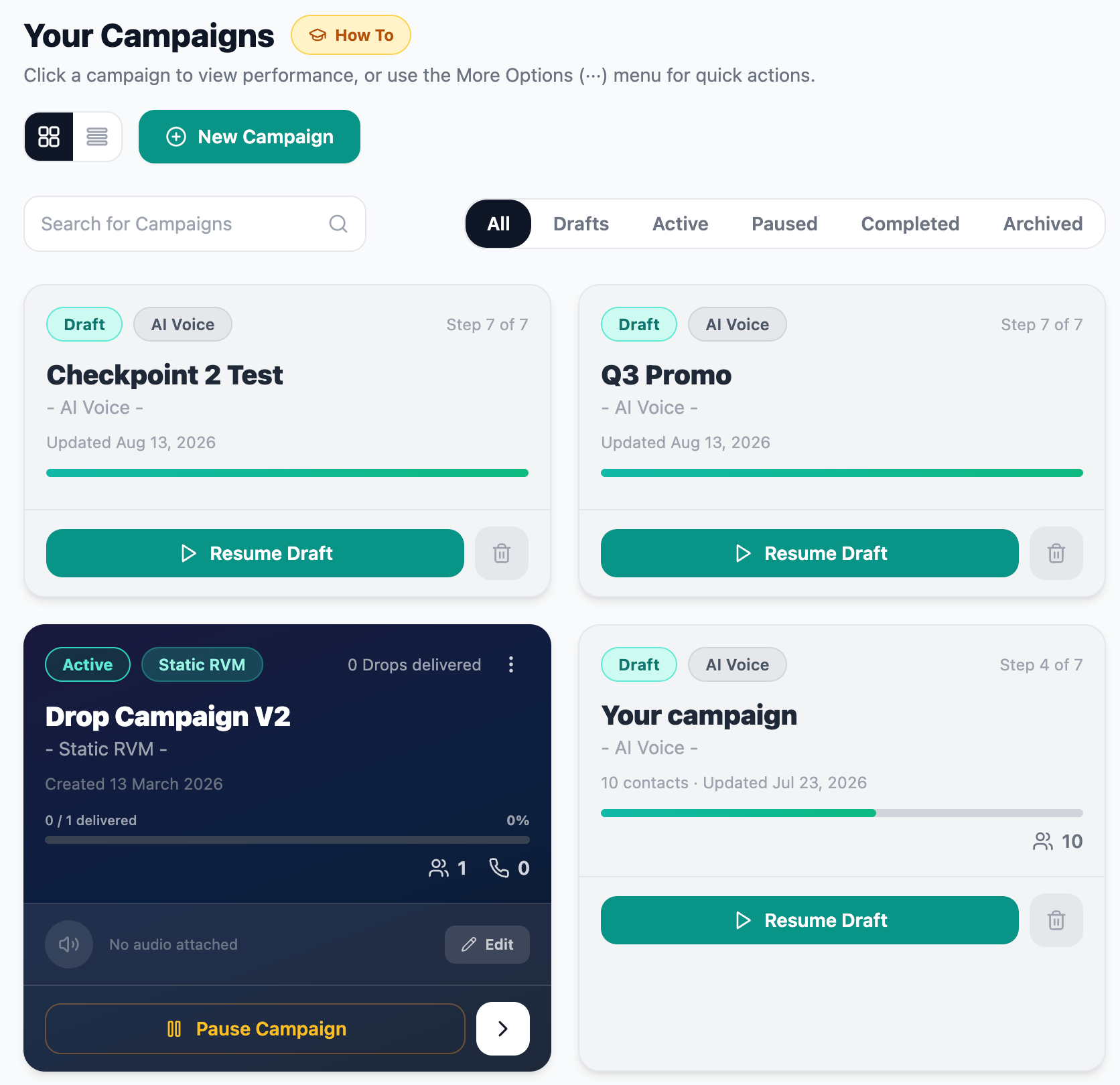
The DropDialer campaigns dashboard — every voicemail campaign, draft, active drop, and delivery status in one place.
What Is Voicemail Drop Software?
Voicemail drop software lets a business create and manage voicemail outreach without requiring someone to manually call every contact and leave each message one at a time.
With DropDialer, teams can prepare the contacts, create the voicemail, launch or schedule the campaign, and monitor activity from one platform.
Some people call this:
The terminology varies. The basic idea is the same: reduce the repetitive work involved in delivering voicemail at scale. For a deeper look at the delivery method itself, read our guide to ringless voicemail.
Leaving Voicemails One at a Time Doesn't Scale Very Well
Manual Process
Build list
Dial contact
Wait
Reach voicemail
Leave message
Hang up
Repeat
DropDialer
Import contacts
Validate numbers
Create message
Build campaign
Launch or schedule
Track activity
Handle responses
The point isn't to eliminate salespeople. It's to stop using salesperson time for a repetitive task that software can handle more efficiently.
Start With the People You Actually Want to Reach
A voicemail campaign is only as useful as the list behind it.
DropDialer lets users bring contacts into a campaign and prepare that audience before messages start going out.
Supported import methods
- Upload CSV files
- Import existing DropDialer contacts
- Import from HubSpot Lists
- Import HubSpot Companies
- Search and select HubSpot contacts
- Import all HubSpot contacts
Bring contacts into a campaign through CSV upload, saved lists, or HubSpot.
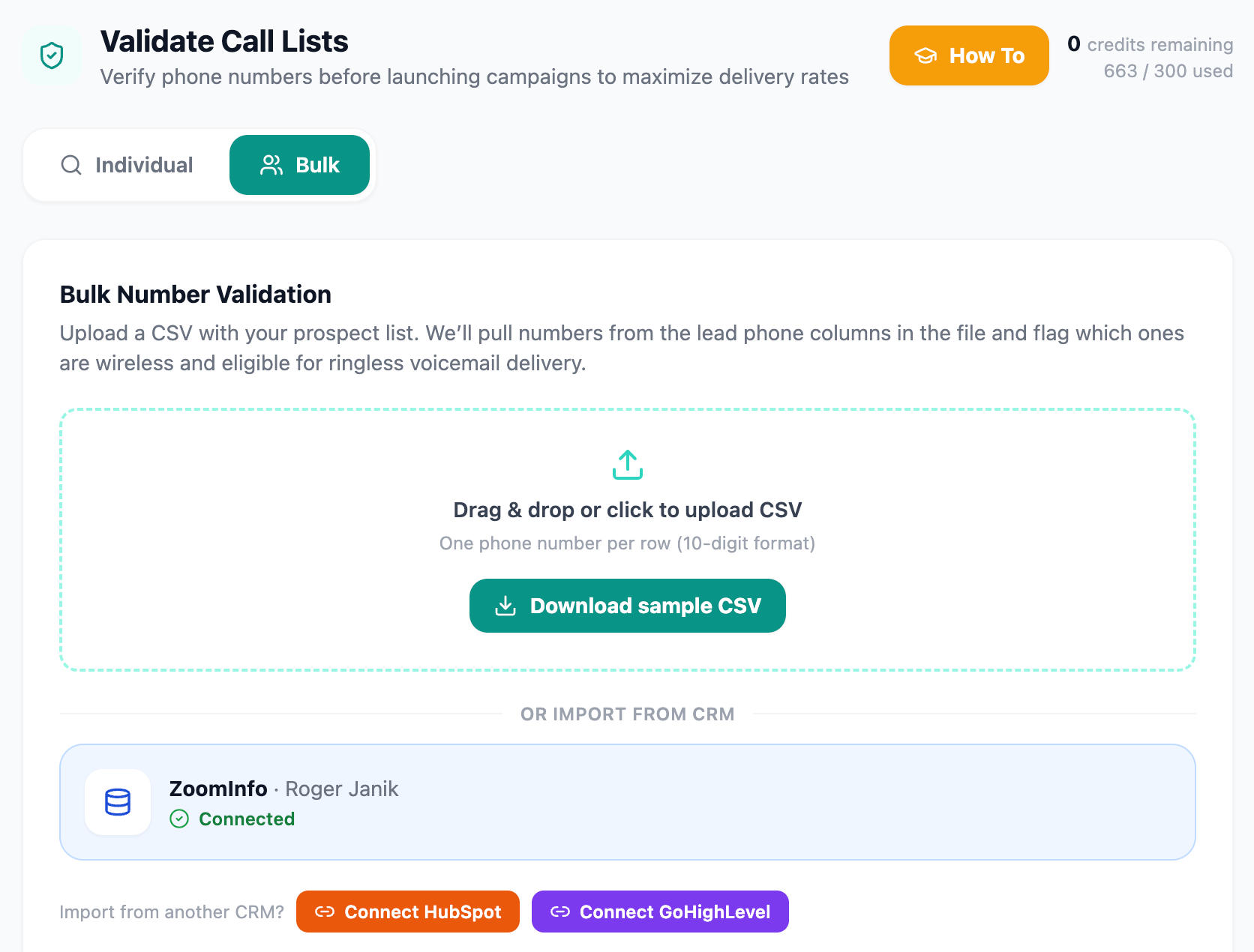
Upload a prospect list and DropDialer flags wireless-eligible numbers and removes DNC and litigator contacts before launch.
Don't Waste Drops on Numbers That Can't Receive Them
Before a campaign launches, DropDialer can check phone numbers for wireless eligibility.
That gives you a cleaner campaign list before voicemail delivery begins and helps prevent campaign activity from being wasted on numbers that aren't appropriate for ringless voicemail.
Compliance screening
DropDialer's compliance screening can remove:
- Wireless eligibility check before delivery
- National DNC matches where applicable
- Known litigator numbers based on the active screening system
These checks help clean a list but do not guarantee compliance or successful delivery. Customers are responsible for using DropDialer in accordance with applicable laws, regulations, and company policies.
Record It Once — Or Use AI Voice
Recorded Voice
Use a recorded voicemail when a single message works well for the campaign.
AI Voice
Use DropDialer's AI voice capabilities when the campaign calls for personalization or scalable message variation.
Not every campaign needs AI. Sometimes a straightforward recorded message is exactly what you want.
Other times, AI voice gives you more flexibility.
DropDialer supports both approaches so the message can fit the campaign instead of forcing every campaign into the same format.
Personalize the Message When It Actually Adds Value
When a more personal message makes sense, DropDialer can use information from your contact data to make the voicemail more specific to the recipient.
"Hi, this is Mike. I wanted to reach out about…"
"Hi Sarah, this is Mike. I was taking a look at Acme Roofing and wanted to reach out about…"
Personalization isn't required for every campaign, and it doesn't guarantee higher response. It's an option when a more specific message fits the campaign.
Build the Campaign in One Place
A DropDialer campaign brings together the audience, the message, and the sending settings in a single workflow.
What you manage in a campaign
- Campaign name
- Contact audience
- Voicemail / message selection
- Voice selection
- Sending settings
- Scheduling
- Callback number
- Campaign status
- Compliance checks
Campaign creation — audience, message, voice, scheduling, and callback number in one workflow.
Launch Now or Schedule It for Later
Not every campaign needs to go out immediately.
DropDialer lets you launch a campaign when you're ready or schedule it for a later time.
That gives teams more control over when outreach runs without requiring someone to sit at a desk manually starting every batch.
Scheduling controls
Make It Easy for Interested Prospects to Call Back
A voicemail needs a clear next step.
For many DropDialer campaigns, that next step is simple: call back.
Configure the appropriate callback destination for the campaign so responses reach the right person or team.
We drop the voice message. Interested prospects dial you back.
Not every campaign will generate callbacks. DropDialer makes the callback path available; results depend on audience, message, and offer.
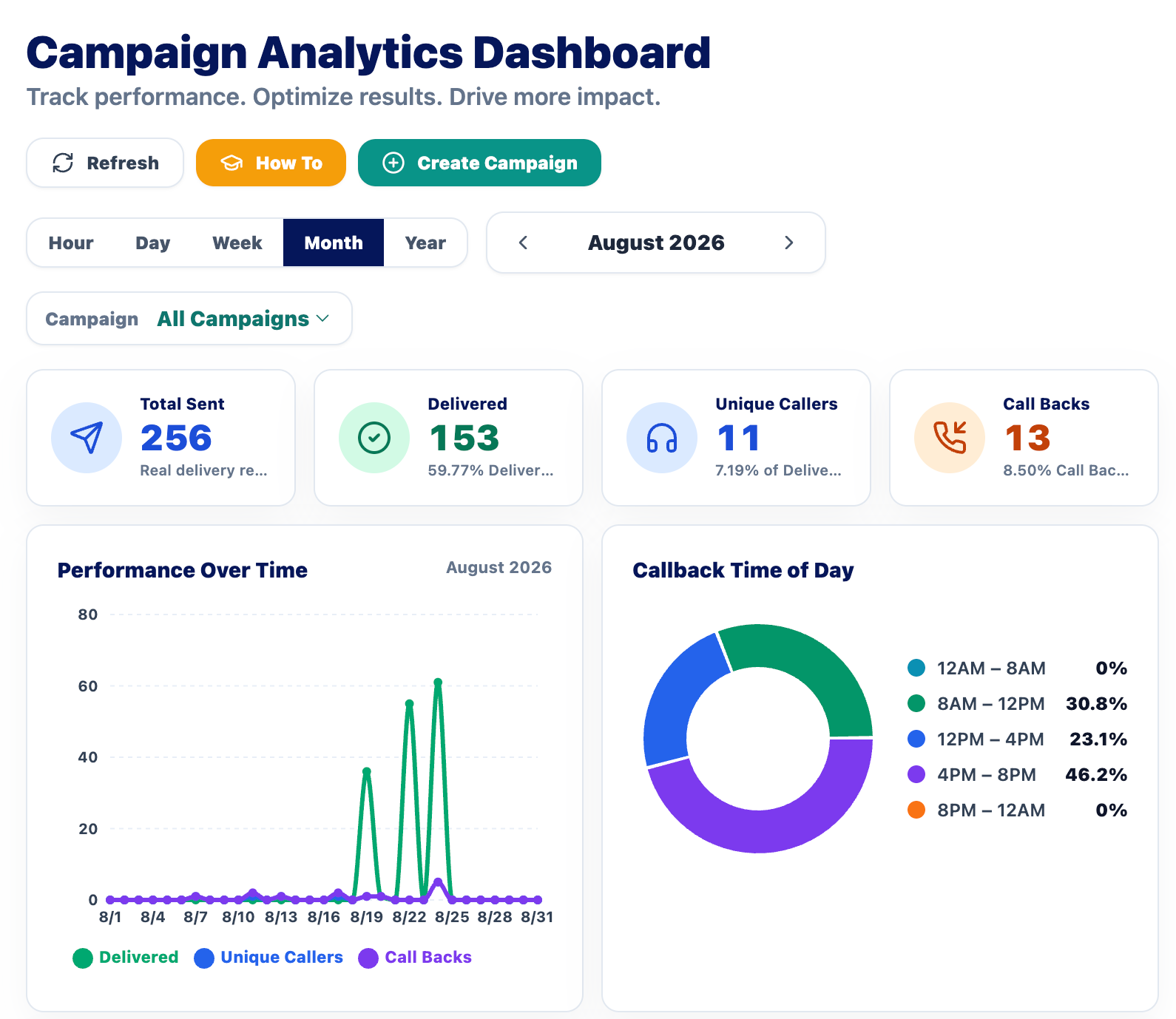
Campaign analytics — delivery, failures, callbacks, and completion in one view.
See What Happened After You Hit Send
Once a campaign is running, DropDialer tracks what happens with it.
Tracked in campaign reporting
- Campaign activity
- Delivery events
- Failed events
- Callbacks
- Campaign completion
- Campaign status
DropDialer reports the metrics the production system actually tracks — no invented listen rates, conversion percentages, or ROI figures.
Connect Voicemail Campaigns With HubSpot
DropDialer's HubSpot integration helps reduce the back-and-forth between your CRM and your voicemail campaigns.
Import contacts from
- HubSpot Lists
- HubSpot Companies
- All Contacts
- HubSpot Search
Log back to contact timeline
- Delivery events
- Failed events
- Callback events
- Completed events
These events are logged back to HubSpot contact timelines as Notes.
HubSpot is available today. Additional integrations may be added over time.
A Voicemail Drop Service Should Do More Than Send a Recording
The delivery itself is only one part of a useful voicemail campaign.
The software around it matters too.
DropDialer brings together:
This is the distinction between simply sending a recording and having software to manage the complete campaign.
Software Handles the Repetition. People Handle the Response.
| Task | Manual Voicemail | DropDialer |
|---|---|---|
| Prepare contact list | Manual | Managed in campaign workflow |
| Check wireless eligibility | Separate / manual | Built into DropDialer |
| Leave each voicemail | Rep does it individually | Campaign handles delivery |
| Record standard message | Repeated as needed | Record once |
| AI voice option | No | Yes |
| Personalization | Manual | AI-supported personalization |
| Schedule campaigns | Manual effort | Yes |
| Track campaign activity | Limited / manual | Campaign analytics |
| HubSpot activity | Manual updates | Integration available |
| Handle actual conversations | Salesperson | Salesperson |
How a DropDialer Campaign Works
Where Automated Voicemail Fits Best
It may make sense for:
It isn't a substitute for good targeting, useful messaging, thoughtful follow-up, or responsible outreach.
Using Voicemail Drops for Sales?
If your main goal is outbound sales, DropDialer can help your team reduce the repetitive voicemail work that sits between a prospect list and an actual conversation.
Why Use DropDialer for Voicemail Drops?
Campaign Management
Build and manage voicemail campaigns in one platform.
Phone Validation
Check wireless eligibility before campaign delivery.
Compliance Screening
Use active screening tools for DNC and litigator matches.
Recorded + AI Voice
Choose the message approach that fits the campaign.
Scheduling
Launch now or schedule outreach for later.
Analytics
Track campaign activity and response events.
HubSpot
Import contacts and write campaign activity back to contact timelines.
Callback-Driven Workflow
Make it easy for interested recipients to respond.
Voicemail Drop Software: Common Questions
What is voicemail drop software?
Voicemail drop software lets businesses create and manage voicemail campaigns without requiring someone to manually dial and leave every message one at a time. The software can handle tasks such as contact preparation, message creation, scheduling, delivery, and campaign tracking.
Is voicemail drop software the same as ringless voicemail?
The terms are often used to describe closely related workflows. Ringless voicemail refers more specifically to delivering a voicemail without a traditional manual call, while voicemail drop software refers to the platform used to create and manage those campaigns.
What is an automated voicemail drop?
An automated voicemail drop is a voicemail delivered as part of a software-managed campaign rather than being manually recorded and left by a person one call at a time.
Can I schedule voicemail drops?
Yes. DropDialer lets users launch campaigns immediately or schedule them for later using the available campaign scheduling controls.
Can I use my own recorded voice?
Yes. DropDialer supports recorded voicemail messages for campaigns.
Does DropDialer support AI voice?
Yes. DropDialer includes AI voice functionality for campaigns where AI-generated or personalized voice messaging is appropriate.
Can voicemail drops be personalized?
Yes. DropDialer's AI voice workflow can use supported contact data to personalize messaging where appropriate.
Does DropDialer check phone numbers before sending?
Yes. DropDialer can check wireless eligibility before campaign delivery and uses compliance-screening tools to identify certain DNC and known litigator matches. These checks help clean a list but do not guarantee compliance or delivery.
Does DropDialer integrate with HubSpot?
Yes. DropDialer can import HubSpot contacts from Lists, Companies, All Contacts, and Search. It can also log delivery, failure, callback, and completion activity back to HubSpot contact timelines.
Can I track voicemail campaign results?
Yes. DropDialer includes campaign analytics and tracks supported campaign and response events, including campaign activity, delivery events, failed events, callbacks, and campaign completion.
Is DropDialer only for sales?
No. Sales prospecting is a major use case, but voicemail campaigns can also fit into other legitimate business follow-up and outreach workflows.
Is voicemail drop software legal?
Rules vary based on jurisdiction, recipient, campaign type, consent, and other factors. Customers are responsible for using DropDialer in accordance with applicable laws, regulations, and company policies.
Looking for related detail? Read our ringless voicemail guide, explore AI ringless voicemail, or see how sales teams use DropDialer, or compare the best ringless voicemail software. For using voicemail as part of a broader outreach strategy, see our voicemail marketing software overview.
Stop Leaving Voicemails One at a Time
Build the list. Create the message. Check the numbers. Launch the campaign. Let your team spend its time on the responses that come back.